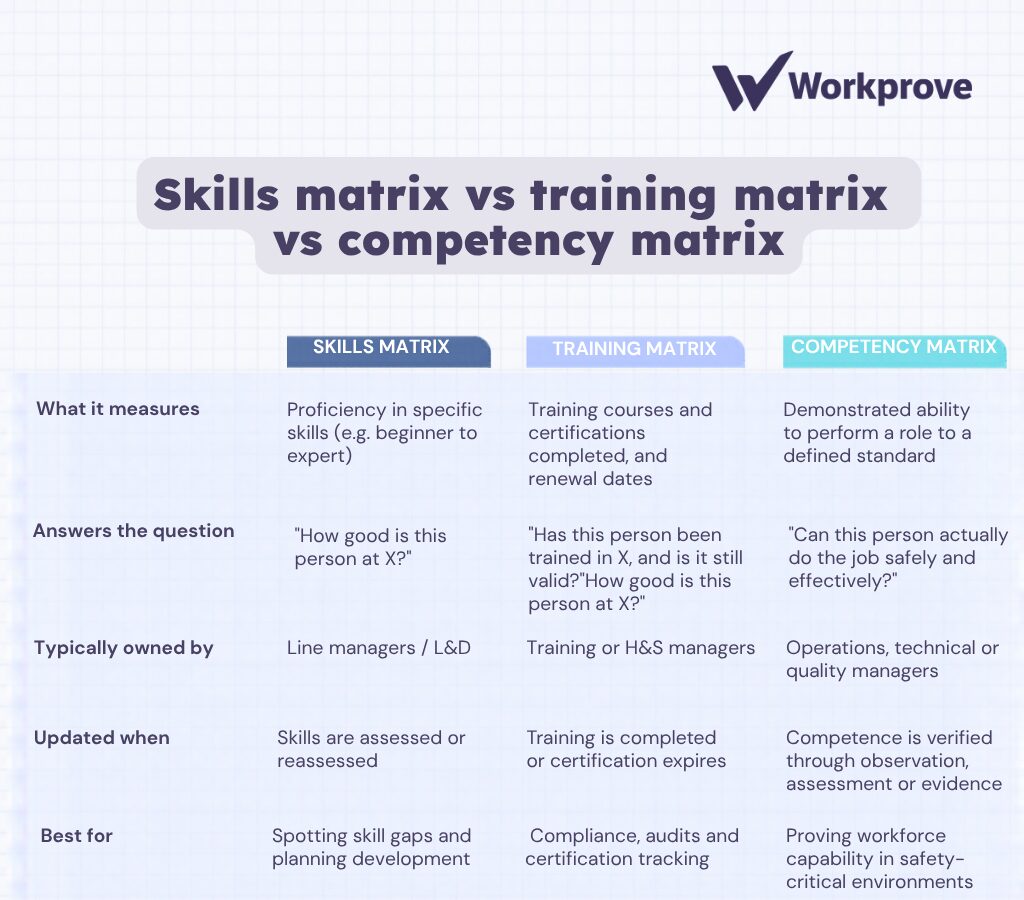
In practice, most organisations use a blend of all three. Training records feed into skills ratings, and skills ratings are one input into competency decisions – completing a course proves attendance, not ability. That’s why platforms like Workprove combine competency management in one system, so the record of what someone has done and evidence of what they can do live in the same place.
What does a skills matrix typically include?
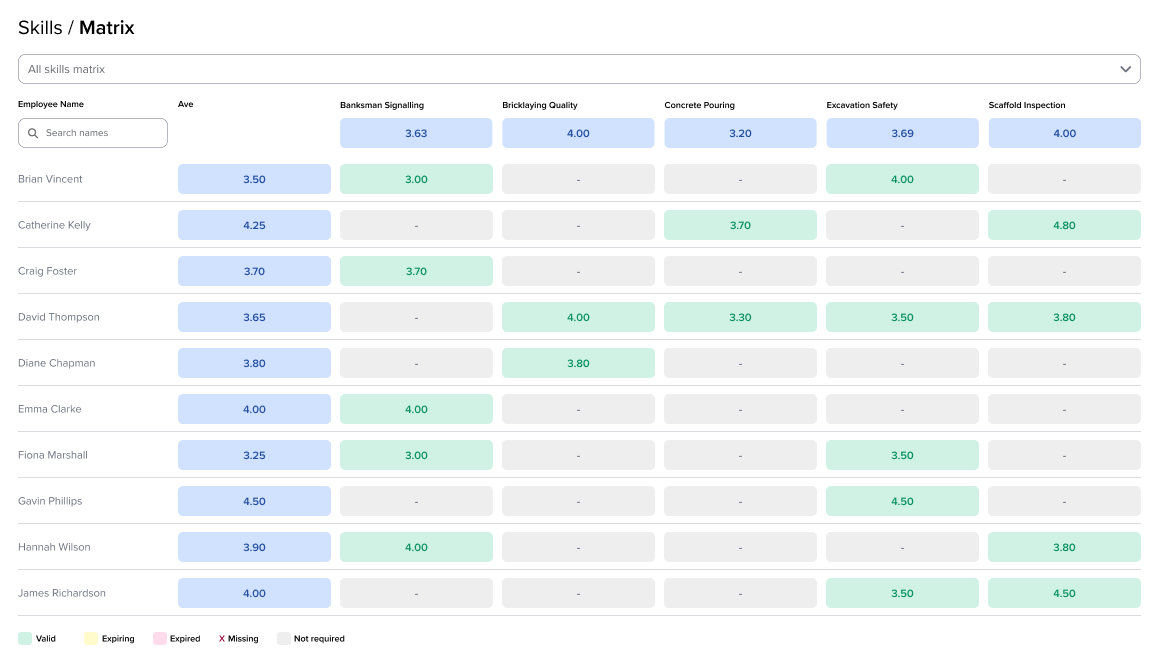
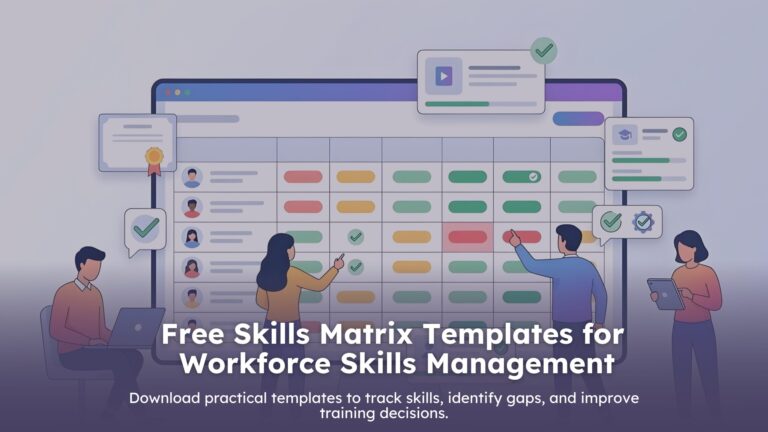
Most skills matrices share the same basic structure, whatever format they’re built in. Individuals or roles sit along one axis, usually rows, and the skills or competencies relevant to your team sit along the other, usually columns.
Each cell where a person meets a skill carries a rating, using whatever proficiency scale you choose. A simple beginner, competent, expert scale works well for most teams, though some organisations prefer a numerical scale (1 to 5) for finer detail, or a traffic light system for fast visual scanning.
Beyond the core grid, a well-built skills matrix often includes a date for when each rating was last assessed, since skills and certifications can lapse or improve over time, and some space for notes or evidence supporting each rating, such as a course completion or a manager’s observation.
Why a skills matrix matters
- Identify skill gaps: see exactly where capability is thin before it becomes a problem, whether that’s a single person needing development or a gap across the whole team.
- Plan for succession: spot who’s ready to step up into a more senior or specialist role, and who needs more development time first.
- Ensure efficient task allocation: assign work based on who’s actually best placed to do it, rather than guesswork or who happens to be available.
- Facilitate team collaboration: give managers and team members a shared, objective reference point for development conversations, rather than relying on memory or assumption.
How to create a skills matrix
Creating a skills matrix is relatively straightforward. The first step is to identify the skills and knowledge that are required for each job role in the organisation. This can be done by conducting a job analysis or by interviewing job incumbents and supervisors.
Once the required skills and knowledge have been identified, they can be listed in a table or spreadsheet. The rows of the table should represent the different job roles in the organisation, and the columns should represent the different skills and knowledge required for each job role.
The next step is to assess the skills and knowledge of each employee. This can be done through a variety of methods, such as employee self-assessment, performance reviews, and skills assessments.
Once the skills and knowledge of each employee have been assessed, the information can be entered into the skills matrix. This will give you a clear overview of the skills and knowledge that your employees have, as well as the skills and knowledge that they need to perform their jobs effectively.
Our step by step guide is easy to follow:
- Identify the key skills: Start by identifying the key skills required for each role within your organisation. These skills should be specific and relevant to the job responsibilities.
- Assess skill levels: Once you have identified the skills, assess the skill levels of your employees. This can be done through self-assessment, manager assessment, or even through skill tests and evaluations
- Rate skill levels:Assign a rating system to measure the skill levels of your employees. This can be a numerical scale, such as 1 to 5, or a descriptive scale, such as beginner, intermediate, and advanced.
- Create a matrix: Create a matrix with the roles on one axis and the skills on the other axis. Fill in the matrix with the skill levels of each employee for each skill. This will give you a visual representation of the skill distribution within your organisation.
- Analyse the matrix: Once the matrix is complete, analyse it to identify any skill gaps or areas where additional training and development may be needed. This will help you plan for future training initiatives and ensure that you have the right people in the right roles.
- Update regularly: A skills matrix is not a one-time task. It should be updated regularly to reflect any changes in skill levels or new hires within your organisation. This will ensure that the matrix remains accurate and useful for talent assessment and skill mapping.
Skills matrix examples by industry
Skills matrices look different depending on the sector and what’s actually at stake if a skill gap goes unnoticed.
In construction, a skills matrix might map plant operation, lifting supervision or confined space competency, since these are safety-critical and tightly regulated. See our construction skills matrix guide for a worked example.
In manufacturing, the focus tends to sit on machine operation, quality control procedures and specific compliance certifications, often tracked across multiple shifts or sites where the same role can carry different requirements depending on the equipment in use.
In food and beverage production, skills matrices typically centre on food hygiene certifications, allergen handling and equipment-specific training, where lapses carry direct regulatory and safety consequences.
Common mistakes to avoid
A skills matrix is only as useful as the discipline behind keeping it current. The most common failure mode is simply letting it go stale, ratings get entered once and never revisited, so the matrix quietly stops reflecting reality within a few months.
Subjectivity is another common issue. Without a clearly defined scale and shared understanding of what each level means, two managers can rate the same person differently, which undermines the whole point of having a consistent record.
Finally, spreadsheets themselves become the limiting factor as teams grow. Version control gets messy, multiple copies circulate, and nobody’s entirely sure which one is current, exactly the problem that pushes most organisations towards dedicated software once they’re past a single small team.
Template vs software
Just getting started? Begin with a free template
If you’re mapping skills for a single team, or just want a quick first pass to see where the gaps are, a spreadsheet template is the right place to start. It costs nothing, takes minutes to set up, and gives you an immediate picture of your team’s capability.
Download a Free Skills Matrix Template
Outgrowing the spreadsheet? That’s where Workprove comes in
Templates have a natural ceiling. As headcount grows, sites multiply, or compliance requirements stack up, manual updates stop keeping pace – versions drift, certifications lapse unnoticed, and audit prep becomes a scramble.
Workprove automates the whole process: live updates, expiry alerts, and one-click audit reports. Its easy-to-read, intelligent competency dashboard gives you complete visibility of your competency status at a glance, so you can see exactly what you need to keep your workforce skills-compliant – without chasing spreadsheets.