Arriving 19 October 2026
Workprove 2.0
This is a big one. Over the last ten weeks we have rebuilt a large part of Workprove around one idea: it is not enough to know that somebody attended a course. You need to know whether they can do the job, today, on that line, on that shift, and you need to be able to prove it.
Do you need to do anything?
-
Nothing has to be set up
Your people, records and permissions are as they were, and every old link still works.
-
Some new features are off until you turn them on
Your screens change only when you choose.
-
To save your first view
Open any list, set your filters and columns, and choose Save view.
-
Cannot find something?
Nothing has been removed. See Where did it go? below.
What changed, step by step
Scroll through the seven changes you will notice first.
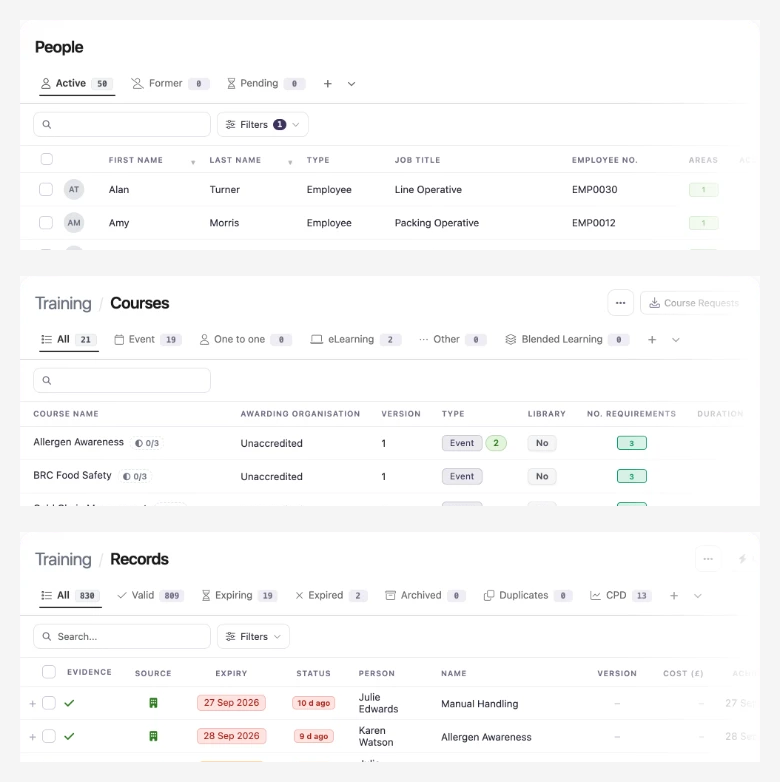
Every list works the same way
Every list in Workprove has been rebuilt on one design. Filtering, sorting, grouping and exporting work the same way on every screen, so whatever you learn on one, you already know on the rest.
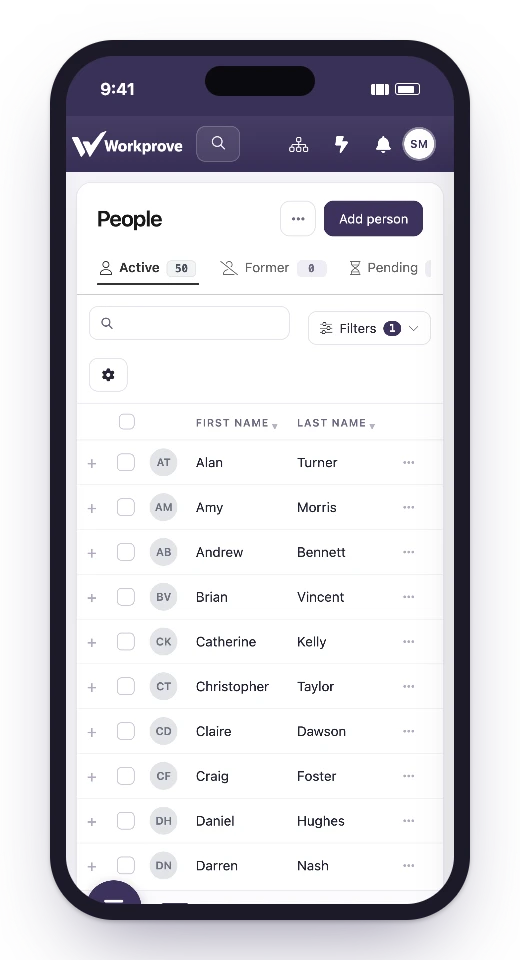
Works on your phone
The rebuilt screens work on a phone, so a briefing can be logged or a record checked on the floor without going back to a desk.
Where did it go?
Nothing has been removed. A few things have moved somewhere more obvious.
- What you used Four separate matrices: training, toolbox talks, medical and skills
- Where it is now One Matrix
- What you used Each module’s own dashboard
- Where it is now All together on one Dashboards page. The dashboards themselves are unchanged
- What you used COSHH, Policies, SOPs, RAMS and the file vault
- Where it is now One Documents area
- What you used eLearning: courses and modules
- Where it is now Training, then Courses and Modules
- What you used Course requests
- Where it is now Training, then Courses
- What you used CPD
- Where it is now Training, then Records
- What you used Assessment criteria
- Where it is now Renamed Skill types
- What you used Settings
- Where it is now Its own menu. Choose Settings and the whole menu changes
- What you used The help button in the bottom right corner
- Where it is now The question mark in the top bar, and Help inside Hey Workprove
What’s new
The six changes that make the most difference. Some depend on add-ons, which are marked.
One honest answer to “is this person competent?”
Four matrices became one. The Competence matrix, the person’s profile, the coverage board and the certificate you hand an auditor all ask the same question and give the same answer. Where somebody falls short, you get the reason in the words your supervisors already use.
Can the line run on Thursday?
Workprove knows who is qualified, who is on shift, who is on holiday and who is in training, and tells you whether each line can run before the shift starts, not after it fails. Where you are short, you can see who is closest to closing the gap.
When something changes, it chases the right people
A procedure changes on Monday. Workprove works out which of your people were signed off against the old one, which can keep working, and who has to be reassessed, then pursues the right people, not everybody.
Get your history in without it hurting
Point Workprove at your certificates, scans, PDFs, photos taken on a phone, and it reads them, works out who each one belongs to, and shows you what it found before anything is saved. Nothing is committed until you have looked at it, and anything can be undone.
Documents that are actually controlled
Link a document to a skill and it issues itself. Anyone whose job needs that competence gets the procedure, reads it, and signs it, and when the document is revised, the people whose sign-off it invalidates are asked again.
Ready for enterprise IT
Single sign-on via SAML. Sign in from Microsoft Teams. Automatic provisioning through SCIM, so joiners, movers and leavers are handled by your identity provider. When an employee leaves, their access ends on the same day.
Everything else
The full release, area by area. Nothing has been removed, so if something looks different it has moved rather than gone.
Everyone
Lists and views
Every list rebuilt on one design, and you can save the views you use.
Menus and search
The menus reorganised, and a search that looks across everything.
Tasks
Documents to read and sign now appear in Tasks alongside everything else.
Help and the copilot
The help content rewritten against the product, and Hey Workprove on every account. Help has moved out of the bottom right corner: it is now the question mark in the top bar, and a Help button inside Hey Workprove.
Clocking in and out
External clock terminals are set up in Settings, then Integrations.
Getting started
Guided checklists that match what you have bought, leading with the next thing to do.
Training and development
Training and courses
eLearning and classroom courses are now one list.
eLearning
Version control for modules.
Toolbox talks
From a place to keep templates to a full delivery cycle.
Bringing your history in
The release to finish getting your existing records in, and anything can be undone.
Managing people and shifts
Competence
The largest piece of work in the release. Four matrices became one.
Readiness
Coverage grew into a section of its own.
Shifts and coverage
Coverage moved from who holds this skill to can this line run.
Equipment
One verdict on whether somebody may operate a piece of equipment.
People
Role families with ordered levels.
Compliance and records
Documents
Proper version control, and required reading that reaches the right people.
Processes and forms
The process engine is now its own thing to buy, and needs Forms.
Accidents and incidents
Where an accident leads to retraining, Workprove records the link.
Supply chain
Your own supply chain profile is free for every organisation.
Reporting and dashboards
Arrange your own dashboard, with every module’s dashboards in one place.
Administrators and IT
Signing in and access
Single sign-on using SAML, so people sign in with the account they already have.
Integrations
Integrations are features, and are switched on by you.
Behind the scenes
Not everything worth doing is visible, and some of this release was not meant to be.
What is included and what is not
Which of these are add-ons rather than part of your existing plan.
Terms, privacy and cookies
Updated Terms, accepted at sign-in rather than assumed.
Improvements and fixes
Smaller things you may have run into.
Questions about Workprove 2.0?
Your account manager can walk you through what changes for your organisation, and what is switched on by default.
Talk to us